jama×ai
REV 2026.05
五步安装 · Microsoft Edge Five steps · Microsoft Edge

把 Jama AI 装进 浏览器 Install Jama AI in your browser

作为 Edge 解包扩展加载——五分钟之内,Jama Cloud 页面顶部就会多出 Jama AI 入口, 语义检索 + 关系穿透 + AI 应答全部在原页面里完成。 Load as an Edge unpacked extension — within five minutes the Jama AI button appears at the top of every Jama Cloud page; semantic search, relationship traversal, and AI answer all happen inside the page.

01STEP

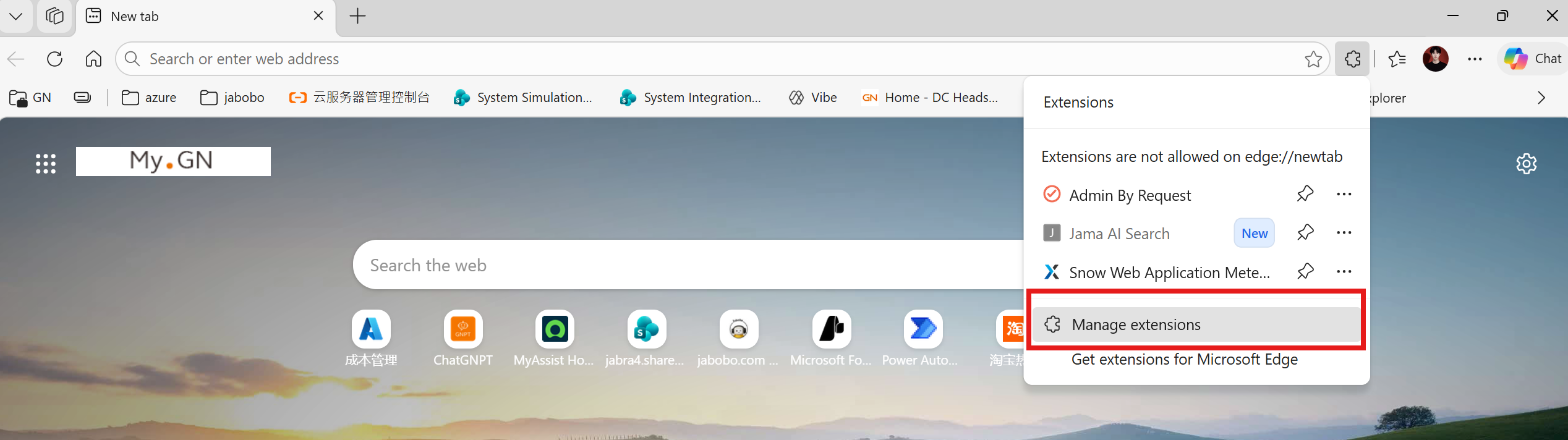
打开 Edge 扩展菜单 Open the Edge Extensions menu

在 Edge 工具栏右上角,拼图图标 即扩展入口;点开后选 Manage extensions,进入扩展管理页。 Click the puzzle-piece icon in Edge's top-right toolbar, then choose Manage extensions to open the extensions page.

  1. 右上角点击 拼图扩展图标Click the puzzle-piece icon top-right
  2. 弹层底部点 Manage extensionsFrom the popover, click Manage extensions
edge://newtab · extensions popover
Edge extensions popover with Manage extensions highlighted
把截图保存为:Save your screenshot at:
images/jama-ai/01-extensions-menu.png
02STEP

开启 开发者模式 Enable Developer mode

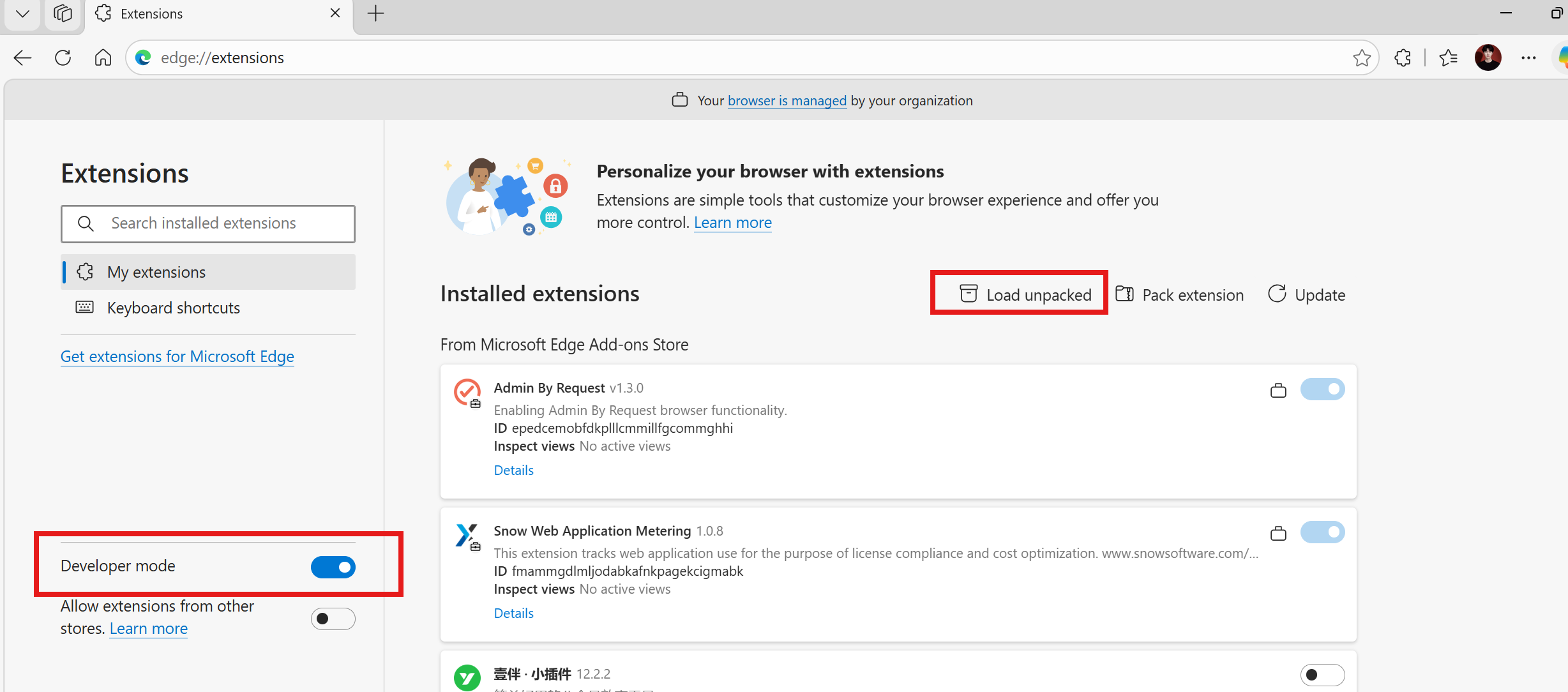
edge://extensions 页面左下角,打开 Developer mode 开关——这一步是为了允许从本地文件夹加载未上架的扩展。然后右上角点击 Load unpacked On the edge://extensions page, switch Developer mode ON in the bottom-left — this allows loading unpacked extensions from a local folder. Then click Load unpacked in the top-right.

  1. 左下角打开 Developer mode 开关Toggle Developer mode ON (bottom-left)
  2. 右上角点 Load unpacked 按钮Click Load unpacked (top-right)
提示Note 若提示"Your browser is managed by your organization"——属正常,不影响开发者模式。 If you see "Your browser is managed by your organization", that's normal and doesn't affect developer mode.
edge://extensions
edge://extensions with Developer mode toggle and Load unpacked highlighted
把截图保存为:Save your screenshot at:
images/jama-ai/02-developer-mode.png
03STEP

选择 插件文件夹 Select the plugin folder

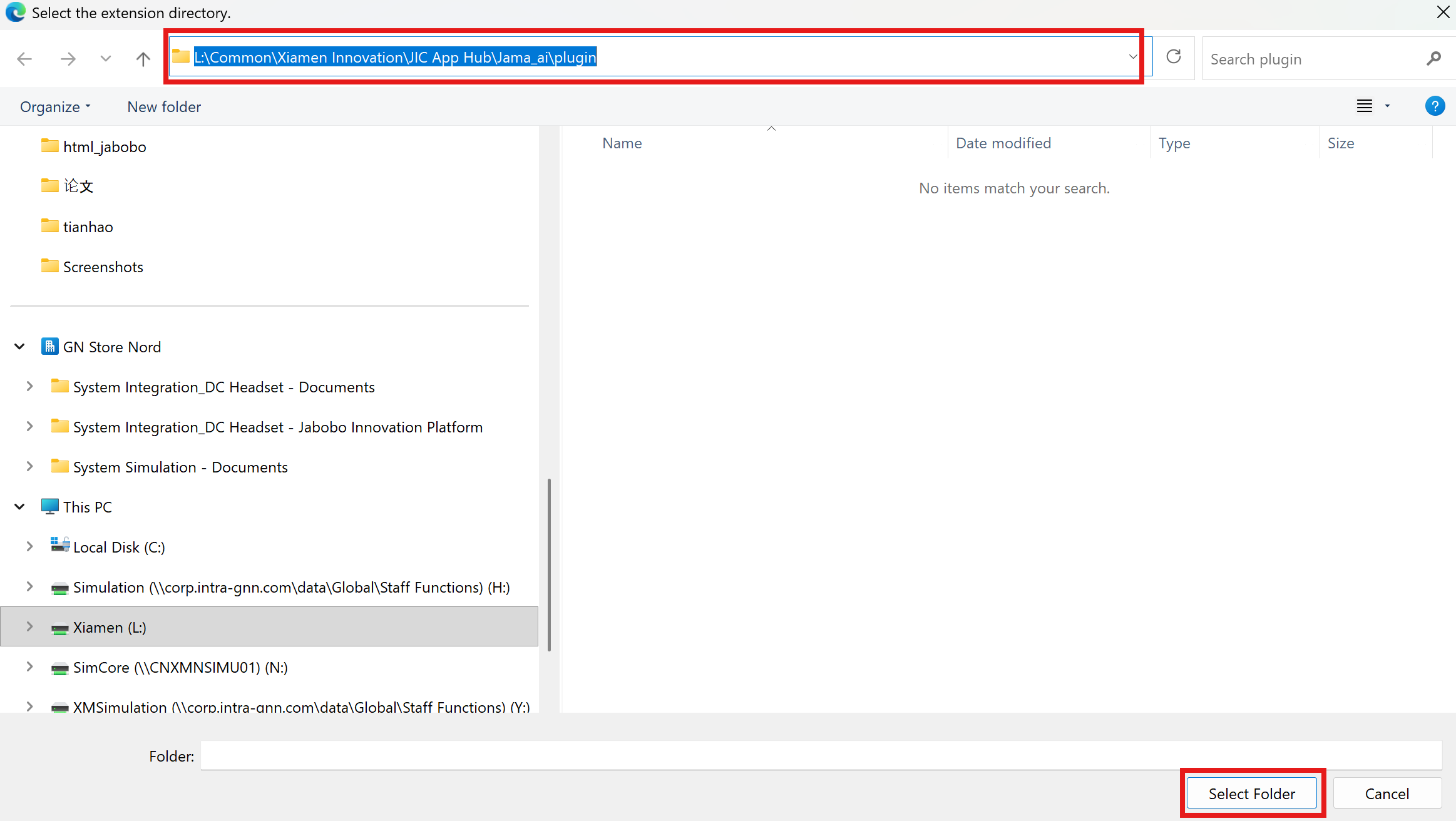
在弹出的文件选择窗口中,导航到团队共享盘上的插件目录,然后点 Select Folder In the folder picker, navigate to the plugin directory on the team share, then click Select Folder.

  1. 地址栏粘贴:L:\Common\Xiamen Innovation\JIC App Hub\Jama_ai\pluginPaste into the address bar: L:\Common\Xiamen Innovation\JIC App Hub\Jama_ai\plugin
  2. 回车进入目录,点击 Select FolderPress Enter, then click Select Folder
必读Important 不要选 plugin 的父目录或子目录——必须恰好是 plugin 文件夹(里面应包含 manifest.json)。 Don't select a parent or child directory — you need exactly the plugin folder (which contains manifest.json).
Select the extension directory
Folder picker dialog at the plugin path
把截图保存为:Save your screenshot at:
images/jama-ai/03-select-folder.png
04STEP

确认 插件已加载 Confirm plugin loaded

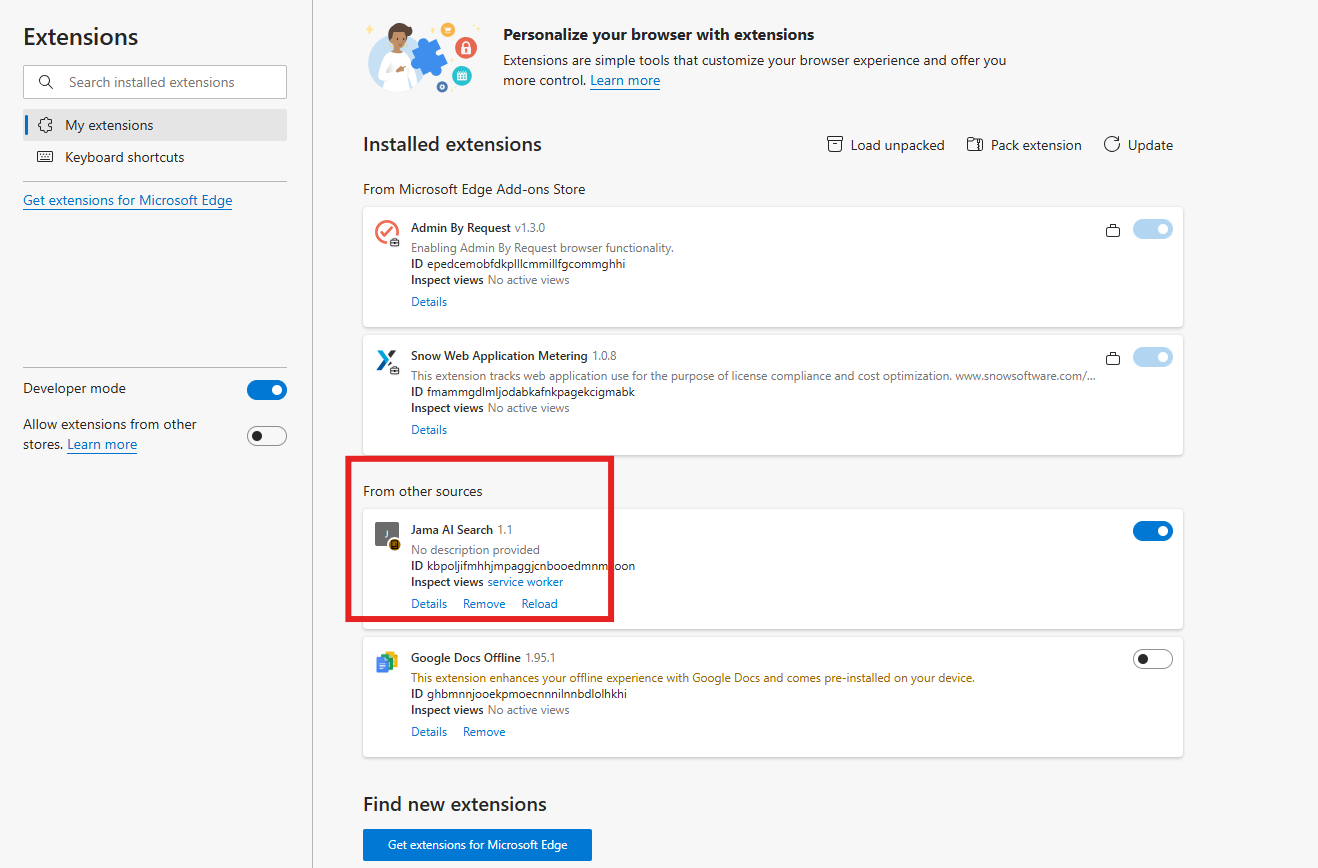
扩展页面会新增 From other sources 区段,里面应当出现 Jama AI Search 1.1;开关已自动打开。 A new From other sources section appears showing Jama AI Search 1.1; its toggle is already ON.

  1. 看到 Jama AI Search 1.1 卡片即成功Spot the Jama AI Search 1.1 card
  2. 右侧开关保持蓝色 / ONKeep the right-side toggle blue / ON
  3. 如需更新插件,点 ReloadTo pick up an update later, click Reload
edge://extensions · loaded
Extensions page showing Jama AI Search 1.1 under From other sources
把截图保存为:Save your screenshot at:
images/jama-ai/04-loaded.png
05STEP

在 Jama 中 启用 Open it in Jama

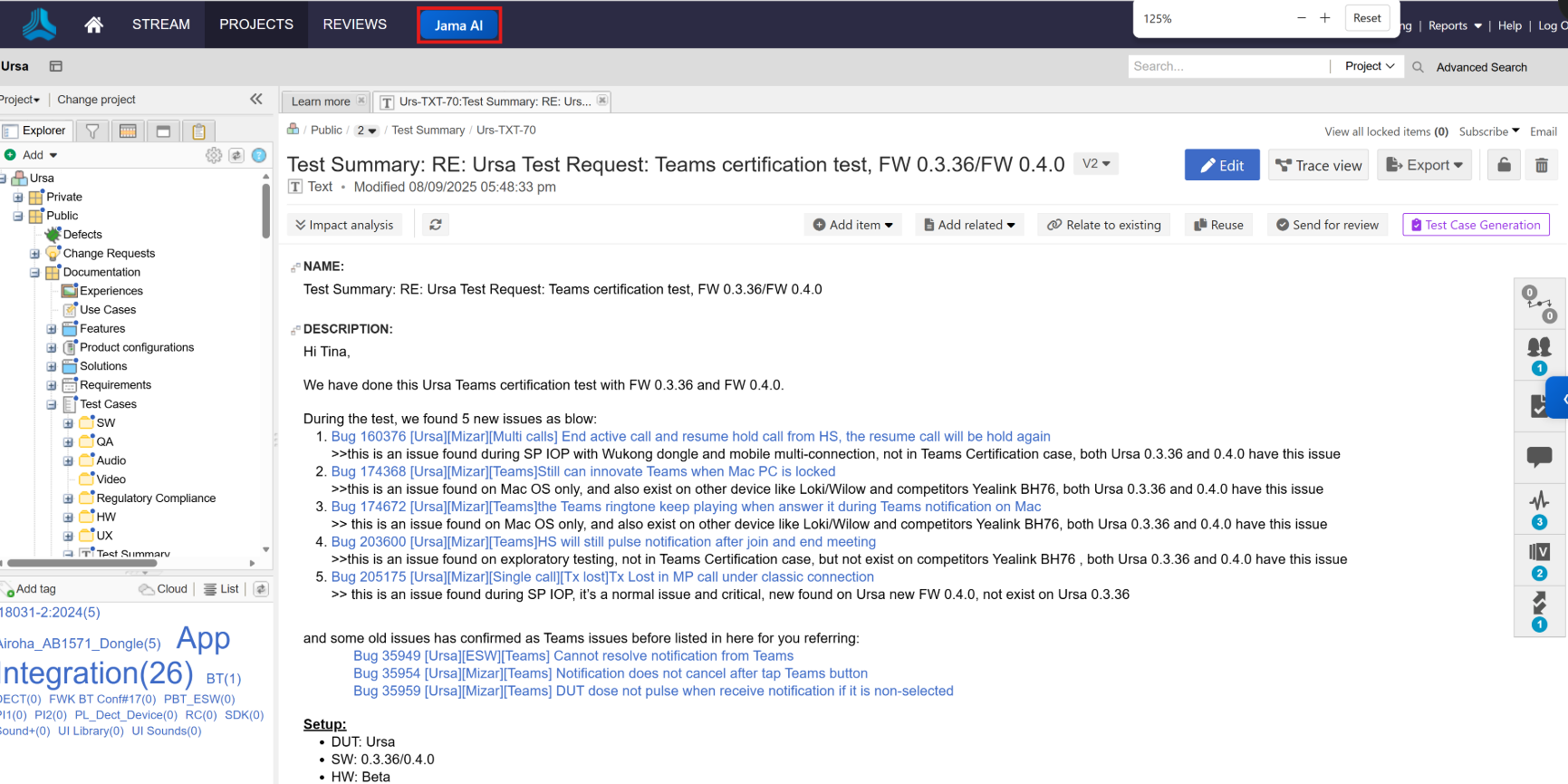
打开任意 Jama Cloud 页面,顶部导航在 STREAM / PROJECTS / REVIEWS 旁边会多出一个 Jama AI 按钮;点击即可调出右侧的 AI 面板,进入 AgentSearch 任一模式。 Open any Jama Cloud page — a new Jama AI button now sits next to STREAM / PROJECTS / REVIEWS in the top nav. Click it to bring up the side panel and pick Agent or Search mode.

  1. 访问 https://*.jamacloud.com/Visit https://*.jamacloud.com/
  2. 点击顶部的 Jama AI 蓝色按钮Click the blue Jama AI tab in the top nav
  3. 右侧面板切到 Agent 做关系穿透检索,或 Search 做单轮语义搜索In the side panel, choose Agent for relationship-aware deep search, or Search for a one-shot semantic query
提示Tip "Current project" 限定在当前打开的项目,"All projects" 会跨项目检索。 "Current project" scopes to the open project; "All projects" searches across.
jabra.jamacloud.com · Jama AI tab
Jama Cloud header showing the new Jama AI button
把截图保存为:Save your screenshot at:
images/jama-ai/05-in-jama.png

装好了。 接下来想看? Installed. What next?

读一下 系统架构图 看 Jama AI 背后这套 FAISS × Azure 检索链路是怎么搭起来的, 或回到 产品海报 把链接发给同事。 Skim the architecture diagram to see how Jama AI's FAISS × Azure retrieval chain hangs together, or grab the product poster to share with a teammate.

常见问题 Troubleshooting

Q · 01

加载时报 "Manifest file is missing or unreadable"? Load fails with "Manifest file is missing or unreadable"?

说明选错了目录。回到 step 3,确认地址栏指向的就是 ...\Jama_ai\plugin 这一级;这个文件夹根部必须有 manifest.json You picked the wrong directory. Go back to step 3 and confirm the address bar points to exactly ...\Jama_ai\plugin; the root of that folder must contain manifest.json.

Q · 02

Jama 页面里看不到 "Jama AI" 按钮? No "Jama AI" button in the Jama page?

在 Jama 页面上 硬刷新(Ctrl+Shift+R);插件的 content-script 在页面已加载完成时不会自动注入,需要重载一次。如果还不行,回 edge://extensions 检查开关是否仍在 ON。 Do a hard refresh (Ctrl+Shift+R) on the Jama page — the content script doesn't inject into pages that already finished loading. If still missing, go back to edge://extensions and confirm the toggle is still ON.

Q · 03

L: 盘连不上 / 路径无法访问? Can't reach the L: share?

需要先连厦门厂内网或 VPN,L:\ 才会挂载。也可以让管理员把 plugin/ 目录打包发你,解压到本地任意位置后重新走 step 3。 You need the Xiamen plant intranet or VPN before L:\ mounts. Alternatively, ask an admin for a zip of the plugin/ directory, unpack it anywhere local, and rerun step 3.

Q · 04

每次更新插件都要重新走一遍流程吗? Do I have to reinstall every time it updates?

不需要。维护者更新了共享盘里的 plugin/ 之后,回到 edge://extensions,对 Jama AI Search 卡片点 Reload 即可。 No. When the shared plugin/ is updated, just go to edge://extensions and click Reload on the Jama AI Search card.